Compared · TradingView · 2026
A free TradingView alternative for order flow
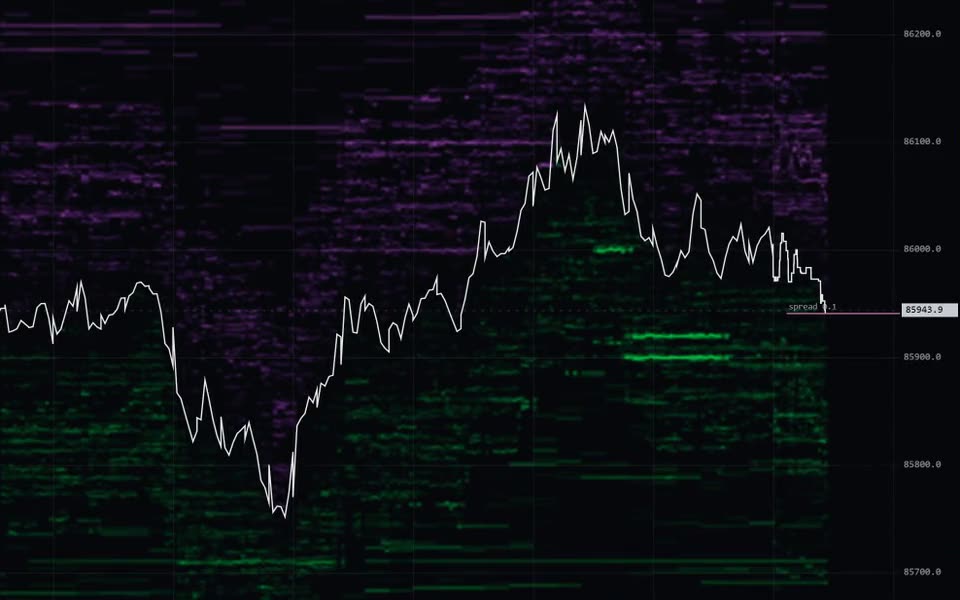
TradingView is the chart most traders start with, and its free Basic plan is enough for price charts. For order flow it is thin: TradingView's pricing page on 18 November 2026 gives Basic 2 indicators per chart and lists the volume footprint, volume profile and TPO under "Orderflow" on its paid plans, from Essential up. Swiftedge is a free alternative for that part: the live order book heatmap, every trade, a footprint chart, volume profile and TPO in the browser, with no account and 4 indicators at a time.
TradingView Basic and Swiftedge, side by side
| TradingView Basic (free) | Swiftedge (free) | |
|---|---|---|
| Price | Free; paid plans Essential, Plus, Premium and Ultimate | Free; optional Swiftedge Plus $9 a month |
| Account | No credit card needed | None |
| Indicators per chart | 2 (Essential 5, Plus 10, Premium 25, Ultimate 50) | 4 at a time (no limit with Plus) |
| Volume footprint | Listed on Essential, Plus, Premium and Ultimate | Yes, 1 minute to 1 hour |
| Volume profile and TPO | Listed under Orderflow on the paid plans | Yes |
| Order book heatmap | Not described; live Level 2 in the DOM through a connected broker | Yes, four updates a second, 15 days of history |
| Every trade on the chart | Not described | Yes, as bubbles by size and side |
| History | 5K bars on Basic | 15 days of the book and trades |
| Markets | 3,539,722 instruments listed on the pricing page | Fifteen perpetual futures markets |
| Own scripts | Pine Script | Script Editor (JavaScript, on the live book) |
| Real trading | Through supported brokers | Paper trading on the live book |
The two
Swiftedge · free order flow
- What it is: Order flow in the browser: Depth (order book heatmap, trades, footprint) and Terminal, on Bitcoin, gold, Ethereum, Solana, XRP, US 500, US 100, silver, WTI crude oil, EUR/USD, Nvidia, Google, Apple, Tesla and SpaceX perpetual futures.
- Price: Free, no account. The optional Swiftedge Plus is $9 a month (unlimited indicators at once, 90 days of history, Replay, seconds charts).
- Free: The live order book heatmap (four updates a second, 15 days of history), every trade as a bubble, candlesticks, a footprint chart, volume profile, TPO, CVD and 30+ indicators (free charts hold 4 at a time), Terminal with up to 16 panels, Alerts and paper trading on the live book.
- Best for: Seeing where resting orders sit and what trades hit them, free, next to the chart you already use.
- Limits: Perpetual futures only; far fewer markets than TradingView; no real orders (paper trading only).
TradingView · best general charting
- What it is: The largest charting platform, with screeners, Pine Script, a community and trading through brokers.
- Price: Basic is free; Essential, Plus, Premium and Ultimate are paid (its pricing page shows the price in your local currency).
- Free: Basic: 1 chart per tab, 2 indicators per chart, 5K historical bars, 1 saved layout; no credit card needed.
- Best for: Charting any market, scripts from its community, alerts and screeners.
- Limits: On Basic: 2 indicators per chart and no volume footprint; its support page describes live Level 2 in the DOM through a connected broker, not a heatmap of the book's history.
TradingView and Swiftedge compared in detail · official site
Where TradingView is ahead
- Markets. Millions of instruments, including stocks, forex, bonds and exchange futures; Swiftedge covers fifteen perpetual futures markets.
- Community and scripts. A huge library of Pine Script indicators and ideas.
- Screeners and trading. Stock, ETF and crypto screeners and trading through supported brokers.
Using both
- Keep TradingView for structure, drawings and your own indicators.
- Open Swiftedge Depth next to it for the live book, every trade and the footprint of the same market.
- Add the free SwiftEdge indicators to your TradingView chart: order flow, liquidity, sessions and VWAP (the list).
More options: the best order flow software, free and paid and sixteen free order flow tools.
Try the free one nowNo sign-up, nothing to install.
Open Swiftedge DepthCommon questions
Is there a free TradingView alternative with order flow?
Yes. Swiftedge shows the live order book heatmap, every trade, a footprint chart, volume profile and TPO free in the browser with no account, on Bitcoin, gold, Ethereum, Solana, XRP, US 500, US 100, silver, WTI crude oil, EUR/USD, Nvidia, Google, Apple, Tesla and SpaceX.
Does TradingView's free plan have footprint charts?
TradingView's pricing page on 18 November 2026 lists the volume footprint under Orderflow on the Essential, Plus, Premium and Ultimate plans, not on Basic.
How many indicators does TradingView allow for free?
Basic allows 2 indicators per chart, according to its pricing page on 18 November 2026. Swiftedge's free charts hold 4 indicators at a time, with no limit on Swiftedge Plus.
Can I use TradingView and Swiftedge together?
Yes. Most traders keep TradingView for the chart and open Swiftedge Depth in a second tab or window for the order book and trades. The free SwiftEdge indicators also run on your TradingView chart.
Is this comparison neutral?
Swiftedge is our product. TradingView's details come only from its own pricing and support pages, checked on 18 November 2026.
Where does Swiftedge's data come from?
Swiftedge reads public perpetual futures data from Hyperliquid and Lighter: the order book and every trade with its aggressor side. Everything shown is Swiftedge's own calculation.
Sources
- TradingView pricing
- TradingView: Volume footprint charts
- TradingView: How do I get level 2 data?
- SwiftEdge on TradingView