Live · free · in your browser
Bitcoin order book heatmap
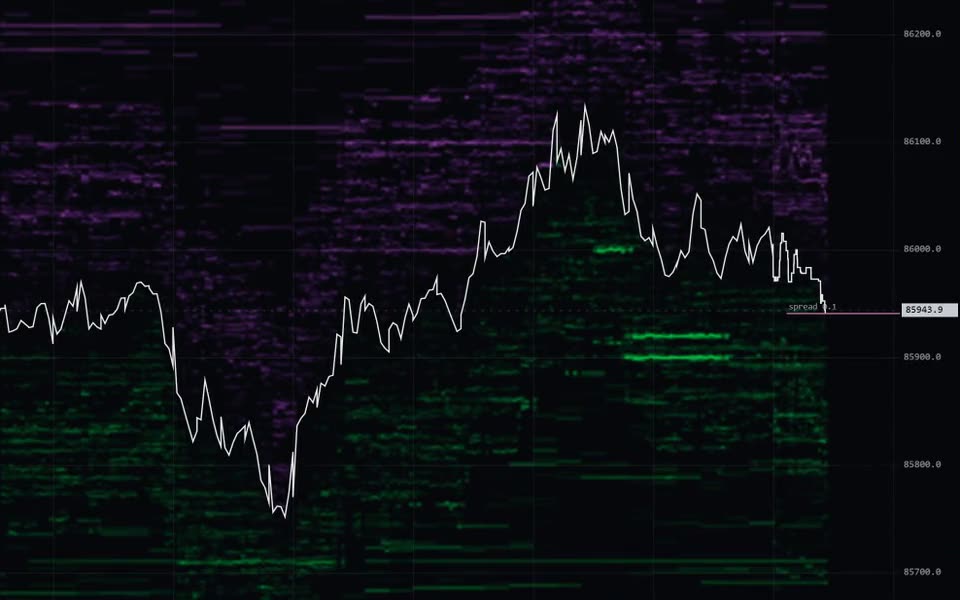
Swiftedge Depth shows a live Bitcoin order book heatmap, also called a liquidity heatmap, of the BTCUSDT perpetual futures book on Binance: free in the browser, with no sign-up, updated four times a second. The heatmap shows where buy and sell limit orders are waiting at every price, and how that changes second by second.
Open the live BTC heatmapFour updates a second, at least 24 hours of history, every trade as a bubble.
Open Swiftedge DepthWhat a Bitcoin order book heatmap shows
Every exchange keeps an order book: a list of limit orders waiting to buy below the current price and to sell above it. A heatmap takes a snapshot of that list many times a second and lays the snapshots side by side. Price runs up the vertical axis, time runs left to right, and each price level is coloured by how much size is resting there.
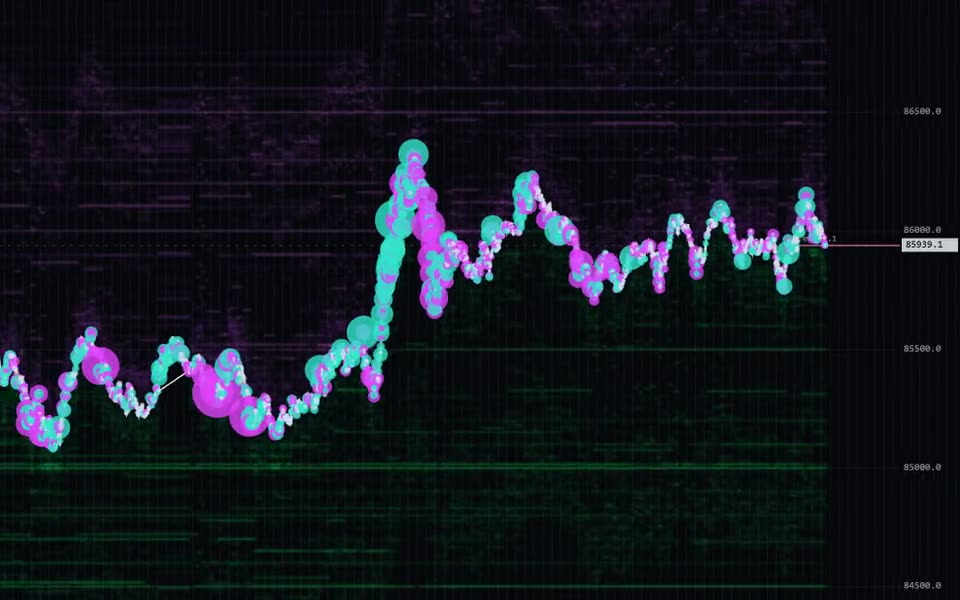
The result is a picture of liquidity over time. Three layers sit on the same grid:
- Resting liquidity, the heat. Orders that are waiting. Nothing in this layer has traded yet.
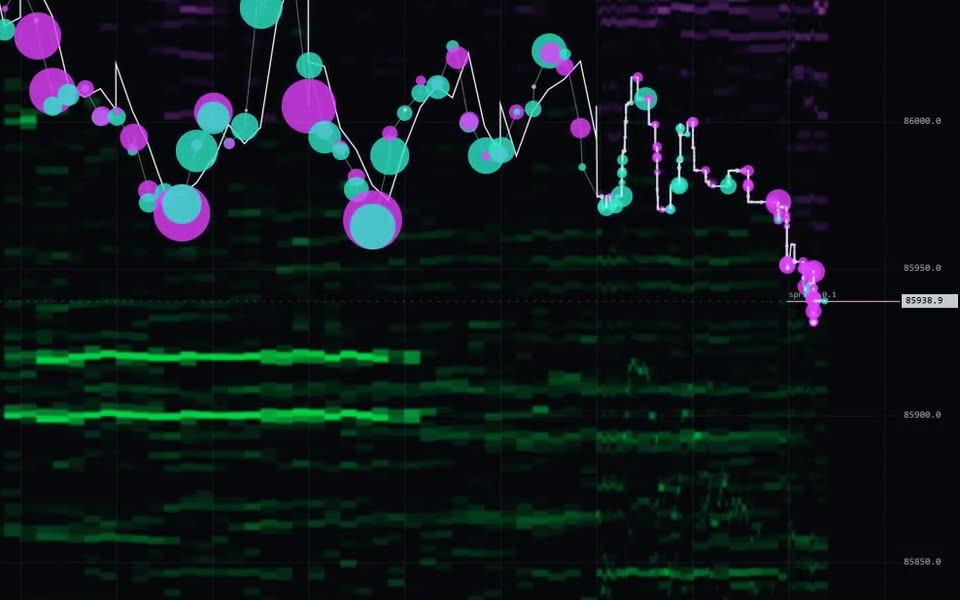
- Executed trades, the bubbles. What actually happened, sized by volume and coloured by the side that crossed the spread.
- Price, the line. The mid price walking through the book.
Why it matters for Bitcoin
Bitcoin futures trade around the clock and the order book is public, so the whole contest between resting orders and aggressive orders is visible as it happens. A candlestick chart only shows the result. The heatmap shows what price had to get through, and what is waiting above and below it now.
- You can see where size is waiting before price gets there.
- You can see whether a level is defended, consumed or pulled, which a candle cannot tell you.
- You can see when the book is thin: less resting size between price and the next level.
- You can see how liquidity changes with the session, from the quiet hours to the London and New York opens.
How to read it, step by step
- Find the bright bands. Green bands below price are bids, violet bands above are asks. The brightest are the largest resting orders, often called liquidity walls.
- Check distance and age. How far is the band from price, and how long has it been there? A level that has rested for an hour is a different thing from one that appeared thirty seconds ago.
- Watch what happens on contact. When price reaches a band, one of three things happens. It holds: bubbles stack on it and it stays bright, because someone refills it. It is eaten: the band dims as trades land and price moves through. Or it is pulled: the band vanishes before any trades land on it.
- Read the bubbles. Size is volume and colour is the aggressor: teal for buyers lifting the ask, violet for sellers hitting the bid. Large bubbles stacking at one level show where the book is being tested.
- Mind the time of day. The same size is a wall in a quiet hour and ordinary during a busy open. Compare like with like.
- Add context. In Depth you can overlay the day's VWAP, the session opening ranges and options levels such as the gamma flip, call wall and put wall.
Displayed size is a claim, traded size is evidence. A large order can be cancelled in a millisecond, and some orders are placed only to be seen (spoofing). Hidden size such as iceberg orders only shows up when it trades. Judge a level by what happens when price reaches it.
Heatmap, depth chart or candles?
| View | Shows | Does not show |
|---|---|---|
| Candlestick chart | Where price traded: open, high, low and close per bar | The orders price had to get through |
| Depth chart or DOM ladder | The order book at this moment | How long a level has been there, or what happened to it |
| Order book heatmap | Resting liquidity over time, with the trades on top | Hidden size until it trades, and other exchanges' books |
Liquidity heatmap vs liquidation heatmap
An order book heatmap, also called a liquidity heatmap, shows real resting limit orders on an exchange. A liquidation heatmap is a model that estimates where leveraged positions might be forced to close. Swiftedge Depth shows the order book, not liquidation estimates.
The two are easy to mix up because both draw bright bands on a price chart. The bands in a liquidity heatmap are orders you could trade against right now; the bands in a liquidation heatmap are estimates of where other traders' stops and margin calls might sit.
What Swiftedge Depth shows
- The BTCUSDT perpetual futures book from Binance USDⓈ-M futures, out to about 2 % from price, with the near book at fine resolution and the deeper band from about 0.22 % to 2 % at coarser resolution.
- A new column four times a second, and at least the last 24 hours of history (older hours load as you scroll back), which you can zoom into down to the raw book.
- Every trade as a bubble, plus execution markers for large trades and a volume pane underneath with CVD since 00:00 UTC.
- Optional layers: the day's VWAP, the Mentor analysis, Session Orbs for Tokyo, London and New York, and GEX options levels from Deribit, OKX and Bybit.
- 24 drawing tools, saved in your own browser. Works on desktop and mobile, with no sign-up.
- Price alerts and large-wall alerts with sound and browser notifications, and it can be installed as an app.
- Share any moment as an image card with a link, and talk it through in the live chat.
Looking for a free Bookmap-style tool for Bitcoin? The free Bookmap alternative for Bitcoin page lists what Depth does and does not do.
Limits to keep in mind
- One exchange. The heatmap shows Binance's BTCUSDT futures book, not every venue where Bitcoin trades.
- Binned prices. Levels are grouped into price bins, so exact sizes can differ slightly from the exchange.
- Not a forecast. A heatmap describes what is in the book now and what happened before. It does not tell you what price will do, and it is not financial advice.
Common questions
Is there a free Bitcoin order book heatmap?
Yes. Swiftedge Depth shows the live BTCUSDT order book as a heatmap in your browser, free during the public beta, with no account and no download.
Which exchange does the heatmap use?
Binance USDⓈ-M futures, BTCUSDT perpetual: the order book out to about 2 % from price and every trade. It is one exchange's book, not the whole Bitcoin market.
Can I see an earlier heatmap?
Yes. Depth keeps at least the last 24 hours; older hours load as you scroll back, and you can zoom in anywhere. The daily BTC report also publishes a heatmap chart of each day with the day's liquidity wall events and options levels.
Does the heatmap work on a phone?
Yes. The chart fills the screen with a bar at the bottom for indicators, drawing, alerts, sharing and chat. Drag to scroll, pinch to zoom time or price, double-tap to return to live, and press and hold to inspect a bubble or level.
Is Swiftedge Depth an alternative to Bookmap?
For Bitcoin, it is a free Bookmap-style order book heatmap that runs in the browser with no account. It covers BTCUSDT perpetual futures on Binance only; platforms such as Bookmap cover many more markets and exchanges. The Bookmap alternative page lists what Depth does and does not do.