Swiftedge Depth
Free live Bitcoin footprint chart
A footprint chart opens every candle and shows how much was bought and how much was sold at each price inside it. Swiftedge Depth now draws one live for Bitcoin and Ethereum, from every trade in the Binance futures book, on top of the order book heatmap. Free, in the browser, no sign-up.
Open the live footprint.One-minute candles to start; change the timeframe in the top bar.
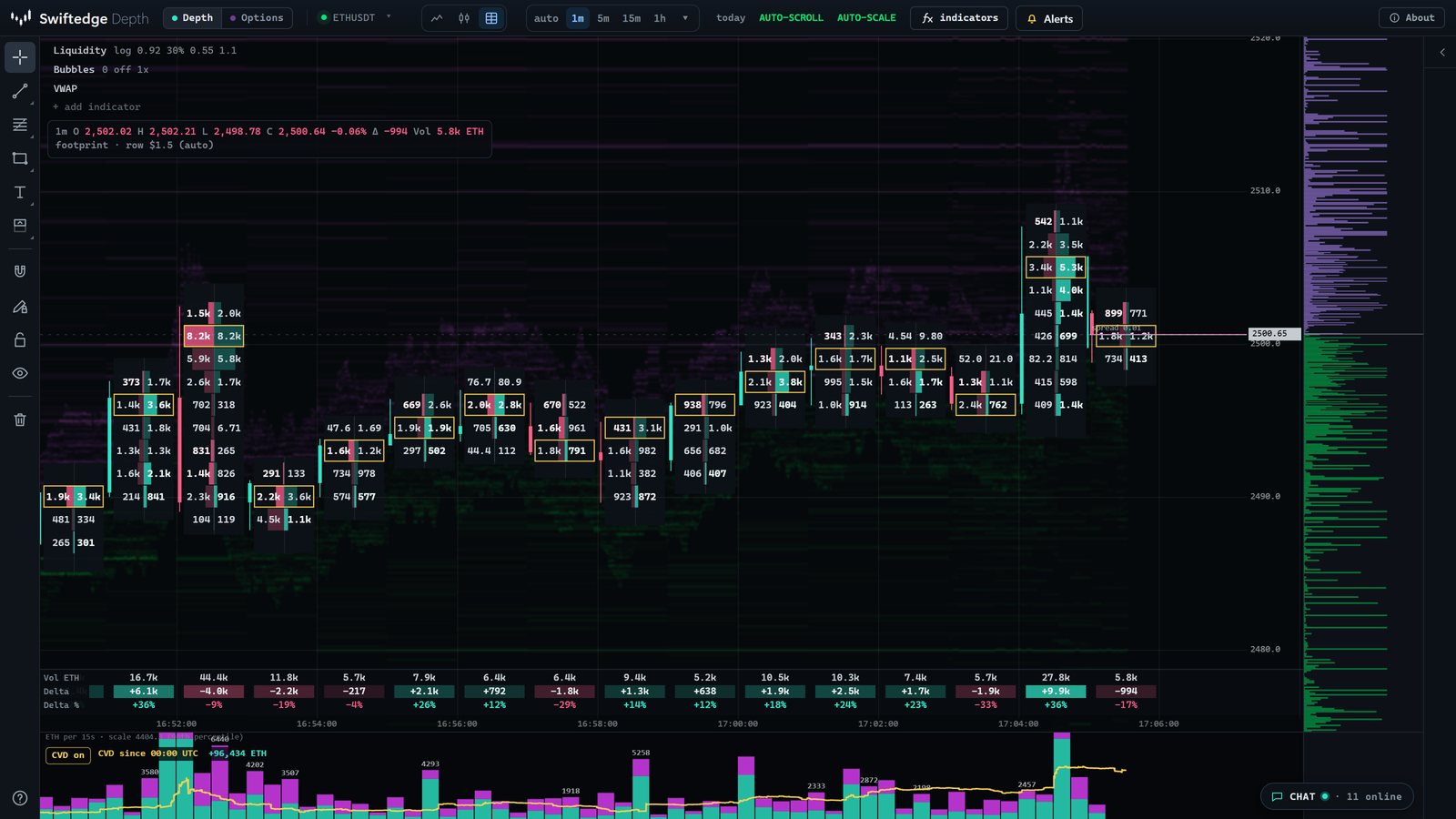
Bitcoin footprint Ethereum footprint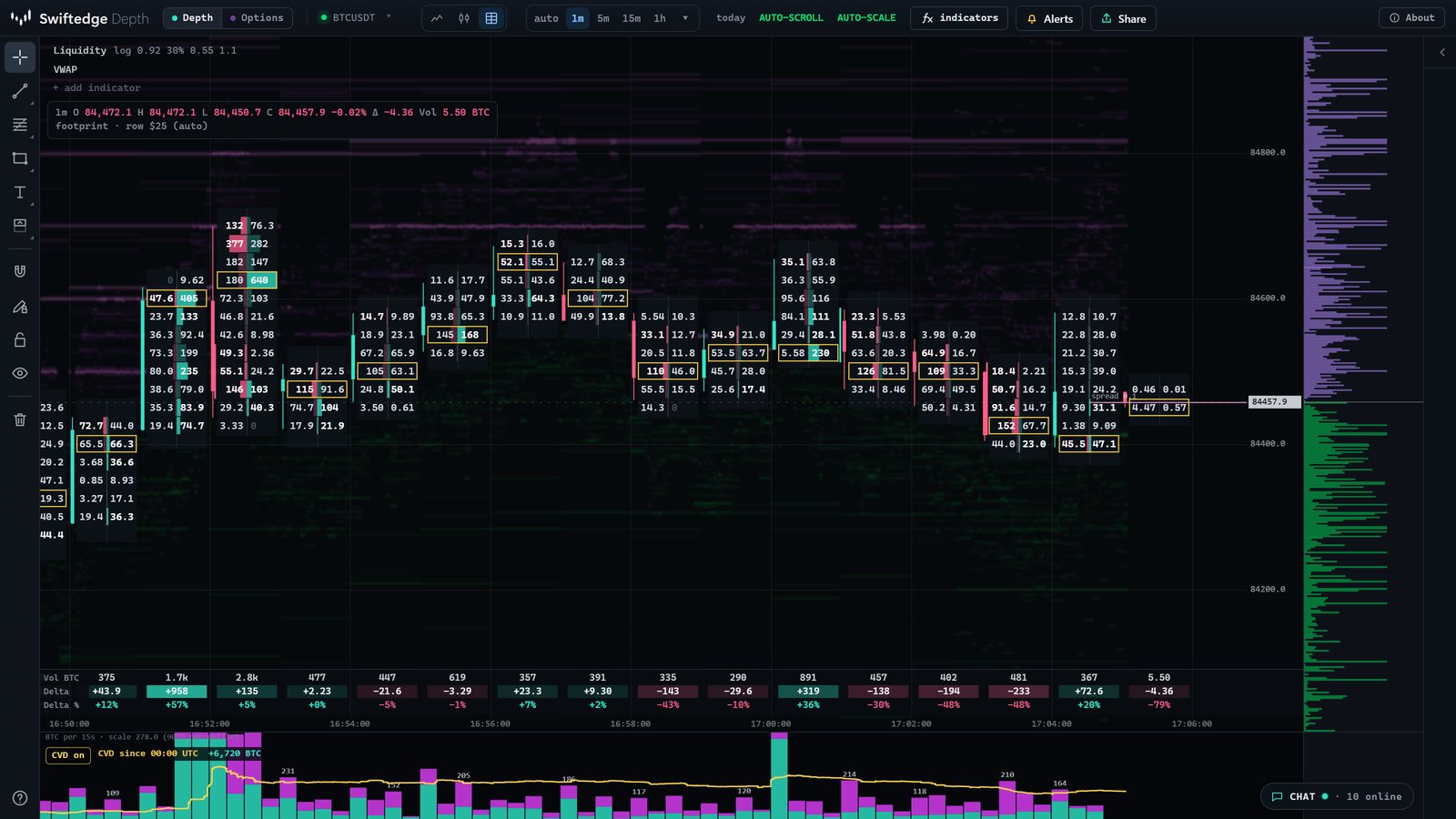
What a footprint chart shows
Each candle is cut into rows, one per price step. Every row holds two numbers:
- Left: sold into the bid. Volume from sellers who hit the bid at that price, the aggressive selling.
- Right: bought from the ask. Volume from buyers who lifted the ask at that price, the aggressive buying.
Behind the numbers, a bar grows from the middle of the cell toward each side, so the heavy prices stand out before you read a single number. Numbers are in BTC on the Bitcoin chart and in ETH on the Ethereum chart.
How to read it, step by step
- Start with the candle's delta. The table under the chart gives each candle's volume, its delta (bought minus sold) and delta as a percentage of volume. A green candle with negative delta means price rose while sellers were the more aggressive side, which is worth a closer look.
- Find the point of control. The row with the most volume in each candle has a yellow frame. It is where most of the candle's business was done.
- Look for imbalances. Swiftedge compares buying at a price with selling one row lower, diagonally, the way aggressive orders actually meet. When one side is at least three times the other, the number is highlighted: teal for buyers, pink for sellers.
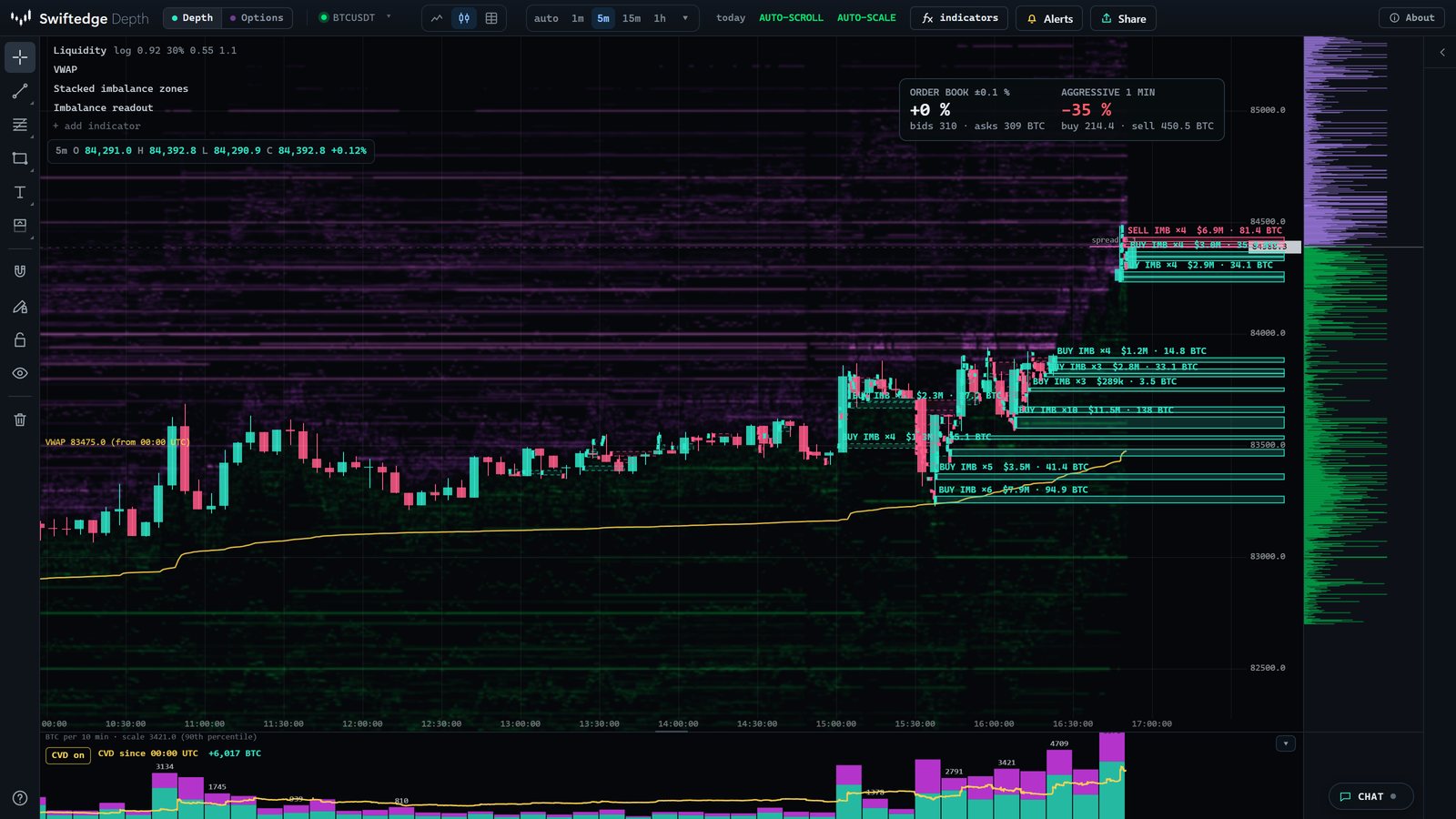
- Notice stacked imbalances. Three or more imbalances in a row on the same side get a bar along the edge of the candle. The stacked imbalance guide shows how long such zones have actually held.
- Check the edges. Very small numbers at a candle's high or low mean price got there and found almost nobody to trade with.
- Compare with the heatmap. The dimmed bands behind the footprint are resting limit orders. A large band that gets traded into with little aggressive volume on the other side, or a band that disappears before price arrives, reads very differently from the same price on a plain footprint.
It scales with the zoom
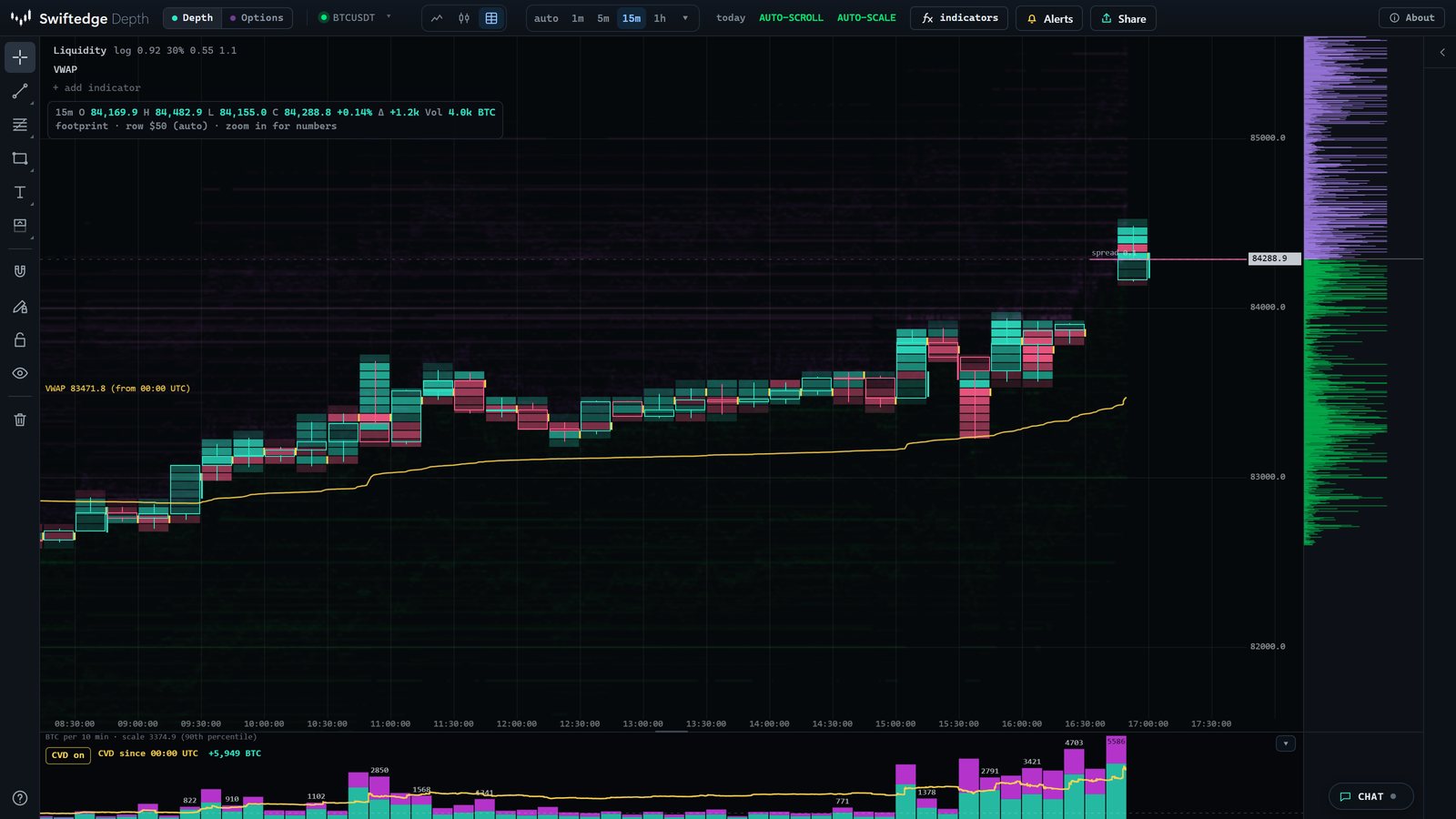
Zoom in and the numbers appear. Zoom out and each row turns into a coloured cell, teal where buyers were more aggressive and pink where sellers were, brighter where more traded. Zoom out further and the chart becomes ordinary candlesticks. The timeframe can follow the zoom (auto) or be fixed from 5 seconds to 1 hour, and the row size can be fixed in the same menu.
Candlesticks and two imbalance indicators
The same update adds candlesticks from 1 second to 4 hours, built from every trade, and two indicators under + add indicator:
- Stacked imbalance zones mark where aggressive buyers or sellers outweighed the other side three times over on several prices in a row. The zone runs to the right until price trades through it. You choose how far back zones are shown: the last hours, today, or from a time of day.
- Imbalance readout shows two live numbers: order book imbalance within a chosen distance of the price, and the imbalance of aggressive buying and selling over the last seconds or minutes.
Open candles with imbalance zones
How Swiftedge builds it
| Source | Every trade in the Binance BTCUSDT and ETHUSDT perpetual futures book, with the exchange's own aggressor side |
|---|---|
| Rows | Automatic from the zoom, or fixed: 1, 2, 5, 10, 25, 50 or 100 USD for Bitcoin (scaled for Ethereum) |
| Timeframes | Footprint 5 seconds to 1 hour, candlesticks 1 second to 4 hours, or auto |
| Imbalance | Diagonal, 300 %: buying at a price against selling one row lower, and the reverse |
| History | About 48 hours, served from complete hours on our server; the newest candle is built in your browser |
| Price | Free, no account |
What it can't tell you
A footprint describes trading that has already happened, on one venue. It does not include spot markets or other exchanges, and it does not say where price goes next. Imbalances in particular are easy to over-read: in our own measurement, most stacked imbalance zones on Bitcoin were traded through within five minutes (see the numbers). Treat the footprint as a precise record of who traded where, not as a signal.
Common questions
Is the Swiftedge footprint chart free?
Yes. Like the rest of Swiftedge Depth it runs in the browser with no sign-up and no paid tier. Open Depth and pick the footprint icon in the top bar.
Is the buy and sell split real or estimated?
Real. Every trade from Binance's futures feed carries the side of the aggressor, the order that crossed the spread. Swiftedge adds each trade to the buy or sell side of its price row as it happens. Nothing is inferred from tick direction.
Which markets does it cover?
Bitcoin (BTCUSDT) and Ethereum (ETHUSDT) perpetual futures on Binance, the same book the heatmap shows. It is one venue, not the whole market.
Which timeframes and row sizes can I use?
Candles from 5 seconds to 1 hour for the footprint, and from 1 second to 4 hours for candlesticks. The row size follows the zoom, or you can fix it at 1 to 100 USD per row for Bitcoin. About 48 hours of history are available.
What is the difference between a footprint chart and a heatmap?
The heatmap shows resting limit orders, the liquidity that is waiting. The footprint shows what actually traded and which side was aggressive. In Swiftedge you see both at once: the footprint is drawn over the dimmed heatmap.
Does it work on a phone?
Yes. Tap the chart type button in the top bar to switch between line, candles and footprint. Zoom in until the numbers appear.