Swiftedge Depth
Free live volume profile chart for Bitcoin, gold, Ethereum and Solana
At 10:03 UTC on 28 October 2026, Bitcoin's volume profile for today (from 00:00 UTC) had its point of control at $81,470 and its value area (70 % of volume) from $80,910 to $81,800, from $3.14B of BTCUSDT perpetual futures trades on Binance recorded by Swiftedge. A volume profile turns the chart sideways: how much traded at each price. Swiftedge Depth draws it live for Bitcoin, gold, Ethereum and Solana, from every trade in the Binance futures book, on top of the order book heatmap. Free, in the browser, no sign-up.
Open the live volume profile.Day profile on 15-minute candles to start; change the profile in the gear next to its name.
Bitcoin volume profile Gold Ethereum Solana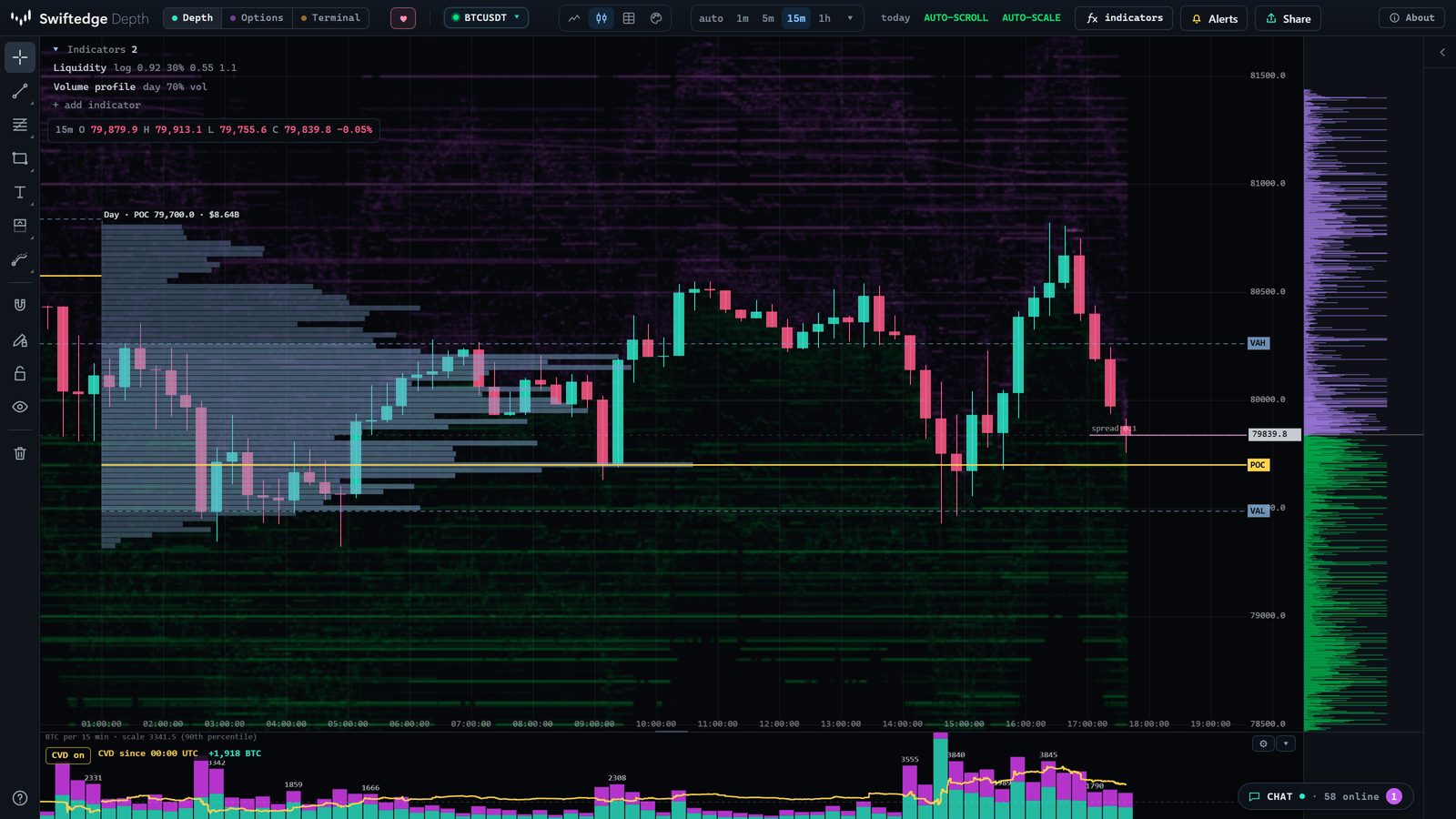
Today's volume profile, live
Updated every five minutes. Today runs from 00:00 UTC; prices are the profile's rows of $10 for Bitcoin, $0.50 for gold, $0.30 for Ethereum and $0.10 for Solana.
| Today | Last price | POC | Value area (VAL – VAH) | Volume | Bought | Price vs value area |
|---|---|---|---|---|---|---|
| Bitcoin | $81,520 | $81,470 | $80,910 – $81,800 | $3.14B | 50 % | inside |
| Gold | $4,062.11 | $4,070.00 | $4,047.00 – $4,076.00 | $540.2M | 51 % | inside |
| Ethereum | $2,373.28 | $2,355.00 | $2,350.80 – $2,373.00 | $2.13B | 53 % | above |
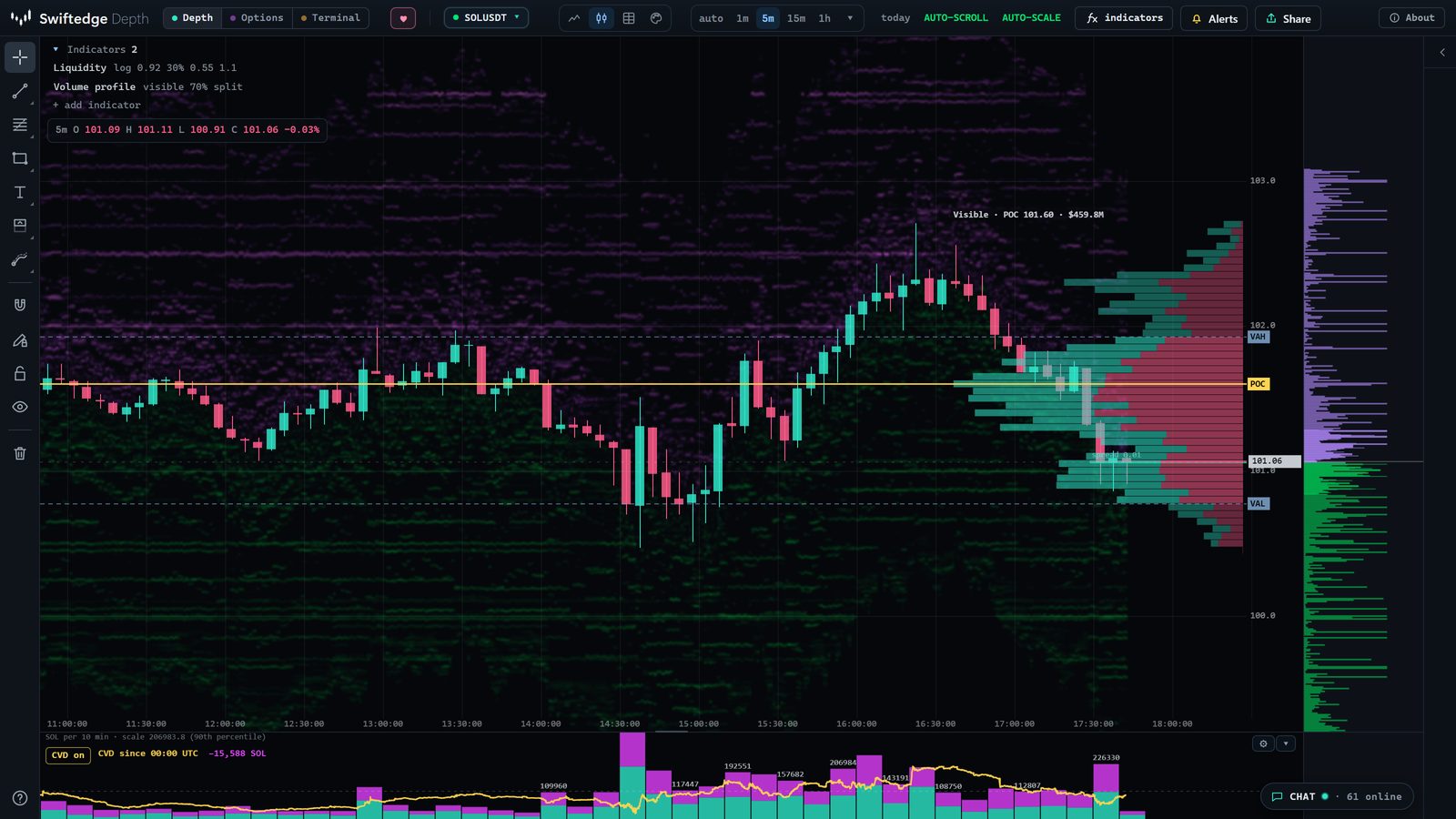
| Solana | $103.08 | $102.00 | $101.60 – $102.80 | $405.1M | 53 % | above |
| Yesterday (full UTC day) | POC | Value area (VAL – VAH) | Volume | POC traded again today? |
|---|---|---|---|---|
| Bitcoin | $80,000 | $79,520 – $80,640 | $7.42B | not yet: still naked |
| Gold | $4,069.00 | $4,051.00 – $4,073.00 | $654.3M | yes |
| Ethereum | $2,349.90 | $2,315.70 – $2,363.10 | $5.26B | yes |
| Solana | $100.00 | $99.80 – $101.00 | $960.7M | not yet: still naked |
What a volume profile shows
An ordinary chart tells you when price was somewhere. A volume profile tells you how much business was done there. Every price row gets a horizontal bar, as long as the volume that traded at that price during the period. Four parts matter most:
- Point of control (POC). The row with the most volume: where buyers and sellers agreed most often.
- Value area (VAH and VAL). The band around the POC that holds 70 % of the volume. Its top is the value area high, its bottom the value area low.
- High and low volume nodes. Thick parts of the profile are prices the market accepted and spent volume at; thin parts are prices it moved through quickly.
- Naked POC. A POC from an earlier period that price has not traded at since. It stays on the chart until price gets back to it.
The volume profile in Swiftedge Depth
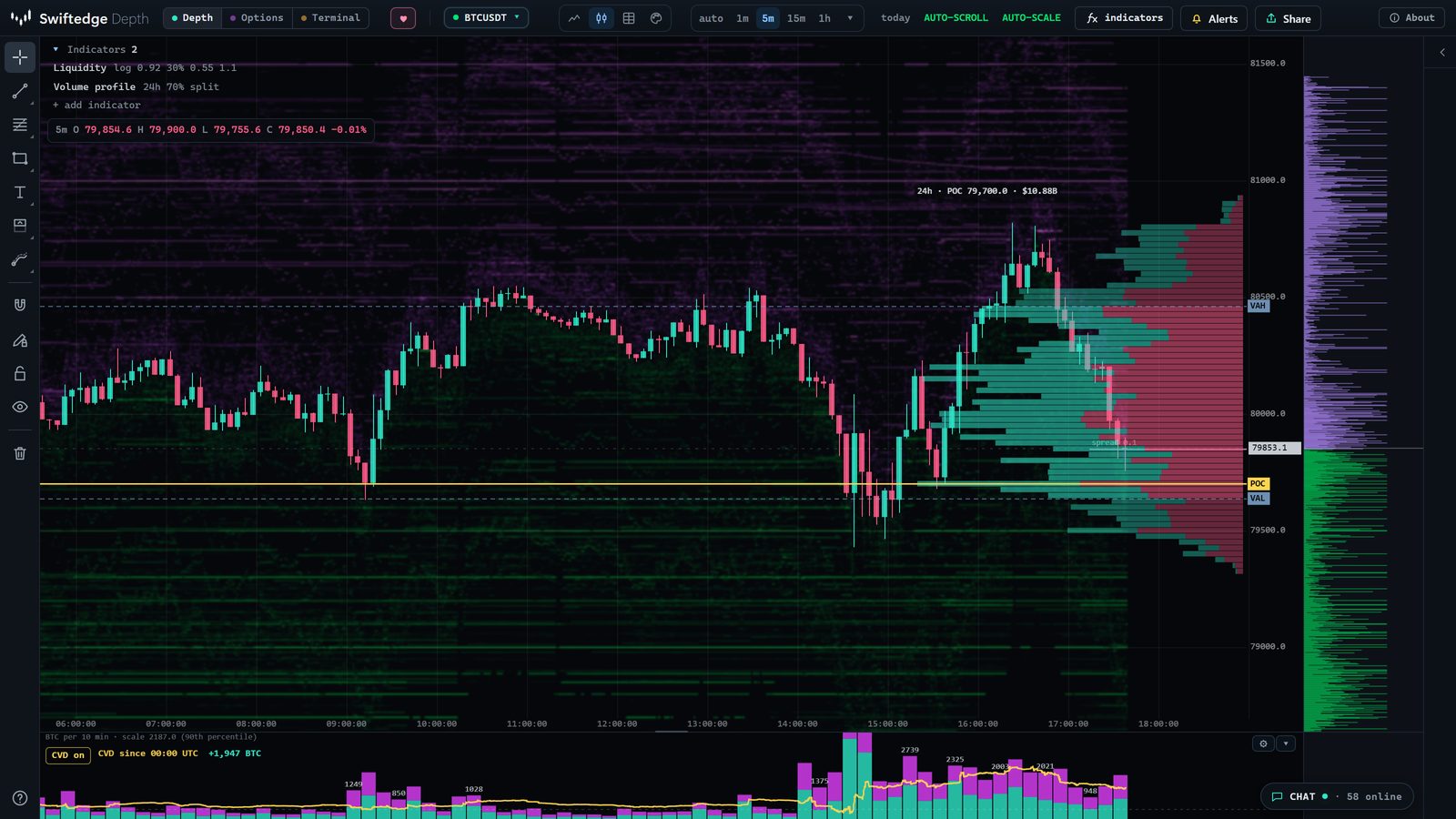
Add Volume profile from + add indicator (it sits under Volume & VWAP), or open one of the links on this page. The gear next to its name opens the settings:
| Setting | Choices |
|---|---|
| Profile per | Day (UTC, the default), session (you set the start times; default 00:00, 07:00, 13:30 and 21:00 UTC), week (from Monday 00:00 UTC), composite (the last 2 to 48 hours, pinned to the right edge) or the visible range (exactly what is on screen) |
| Show | Total volume, buy and sell volume side by side, or delta (buy minus sell) per row |
| Levels | POC, value area high and low lines, naked POCs, labels on the price axis |
| Value area | 50 to 95 % of volume (70 % by default) |
| Rows | Automatic from the zoom, fine or coarse |
| Look | Width, opacity and the colour of every part |
| Data | The last 48 hours from every trade, with the exchange's own buy or sell side; the weekly profile from five-minute candles (volume spread over each candle's range) |
Draw your own: range profile and anchored VWAP
Two drawing tools sit under Volume in the drawing toolbar on the left:
- Volume profile (range). Drag over any stretch of time. You get a buy and sell profile for exactly that interval, with its POC, value area high and low, total volume and delta written above it. Within the last 48 hours it uses single trades; further back it uses five- or fifteen-minute candles.
- Anchored VWAP. Click a candle, such as a swing high, a news spike or the start of a move, and the volume-weighted average price runs from there with ±1 standard deviation bands.
For VWAPs that reset on their own (daily, session, weekly, monthly and rolling, with up to ±3 standard deviation bands), add VWAP bands & anchors. A TPO profile is the time-based twin of the volume profile.
How to read it, step by step
- Find where price is against the value area. Inside it, the market is trading where most of the volume was done. Above or below it, price is testing prices the market has not yet accepted.
- Treat the POC as the period's fair price, not as a wall. Price often rotates around it; the profile does not say whether it will hold.
- Look at the thin parts. Low volume nodes between two thick parts are where price moved fast before. They can be crossed quickly again.
- Check the split. Switch the profile to buy and sell, or to delta. A thick row where sellers dominated reads differently from one where buyers did.
- Keep yesterday in view. Yesterday's value area and a naked POC give today's chart a frame. The table above shows whether yesterday's POC has been traded again.
- Compare with the heatmap. The bands behind the profile are resting limit orders. A thick volume row that lines up with a large resting order, or a thin row with no orders, is context you cannot see on a profile alone.
Compared with TradingView, Exocharts and ATAS
Volume profiles are standard in charting platforms, and the others cover far more markets. Here is what each offers, from their own pages, checked on 26 October 2026 (Exocharts and ATAS prices as on our Exocharts and ATAS comparisons, checked 21 October):
| Profiles | Markets and price | |
|---|---|---|
| Swiftedge Depth | Day, session, week, composite (2–48 h), visible range and a drawn range; volume, buy and sell or delta; POC, value area, naked POCs; drawn on the live order book heatmap | Bitcoin, gold, Ethereum and Solana perpetual futures on Binance. Free, no account, in the browser and on phones |
| TradingView | Session, session HD, visible range, fixed range, periodic and auto anchored volume profiles, as indicators or drawing tools (TradingView support) | Thousands of symbols across asset classes. Free and paid plans; plans differ in how many indicators you can use per chart |
| Exocharts | Volume and TPO profiles in Desktop Pro, next to footprint charts and DOM | Many crypto exchanges, plus CME and other futures via dxFeed. Desktop Pro from 38 USD a month, Web from 23 USD a month (six-month plans) |
| ATAS | A TPO and Profile indicator that shows a volume profile, TPO or both, by period, with volume, delta or time profiles and a value area | Crypto, futures and stocks on desktop. A free Start plan; paid plans from 19.95 EUR a month on yearly billing |
Where the others are better: more markets and exchanges, long tick history (Swiftedge keeps about 48 hours of single trades), and full trading platforms. Where Swiftedge is different: it is free, it needs no install or account, and the profile sits on the live order book heatmap with options levels (GEX), liquidations and the footprint one click away.
What it can't tell you
A volume profile describes trading that has already happened, on one venue: the Binance perpetual futures book. It leaves out spot markets and other exchanges, and it does not say where price goes next. POCs, value areas and naked POCs are widely watched, which is a reason to know where they are, not evidence that they hold. Treat the profile as a precise record of where volume traded.
Common questions
Is the Swiftedge volume profile free?
Yes. Like everything on Swiftedge it is free, in the browser, with no account. Open Depth, choose + add indicator and pick Volume profile, or use this link, which adds it for that visit only.
What is the point of control (POC)?
The price row where the most volume traded in the profile's period. Swiftedge draws it as a yellow line and labels it on the price axis.
What is the value area, and why 70 %?
The band of prices around the POC that holds a set share of the period's volume, 70 % by default (you can choose 50 to 95 %). 70 % is a convention from market profile, roughly one standard deviation; it is not a law of the market.
What is a naked POC?
A point of control from an earlier period that price has not traded at since. Swiftedge extends it as a dotted line and labels it nPOC until price trades through it. Many traders watch naked POCs; whether price returns to them is not guaranteed.
Which profiles can I show?
Per UTC day, per session (you set the session start times), per week, a composite of the last 2 to 48 hours, or the visible range. The Volume profile (range) drawing tool adds a profile over any interval you drag.
Is the buy and sell split real?
Yes. Every trade in Binance's futures feed carries the side of the aggressor, and Swiftedge adds it to the buy or sell side of its price row. The weekly profile is the exception: it spreads five-minute candle volume over each candle's range, so it is an approximation.
How far back does it go?
About 48 hours of every trade, enough for today's and yesterday's day and session profiles. The weekly profile and drawn ranges older than 48 hours use five- or fifteen-minute candles instead of single trades.