Swiftedge Depth
Free live TPO chart (market profile) for crypto and gold
At 07:34 UTC on 28 October 2026, Bitcoin's TPO profile for today (16 half-hour periods so far) had its TPO point of control at $80,900 and its value area from $80,825 to $81,100, built from BTCUSDT perpetual futures trades on Binance recorded by Swiftedge. The initial balance, 00:00 to 01:00 UTC, ran from $80,660 to $80,868. A TPO chart, or market profile, shows how long price spent at each level, one letter per half hour. Swiftedge Depth draws it live for Bitcoin, gold, Ethereum and Solana over the order book heatmap. Free, in the browser, no sign-up.
Open the live TPO profile.30-minute candles to start; the gear next to its name changes letters, rows and colours.
Bitcoin TPO Gold Ethereum Solana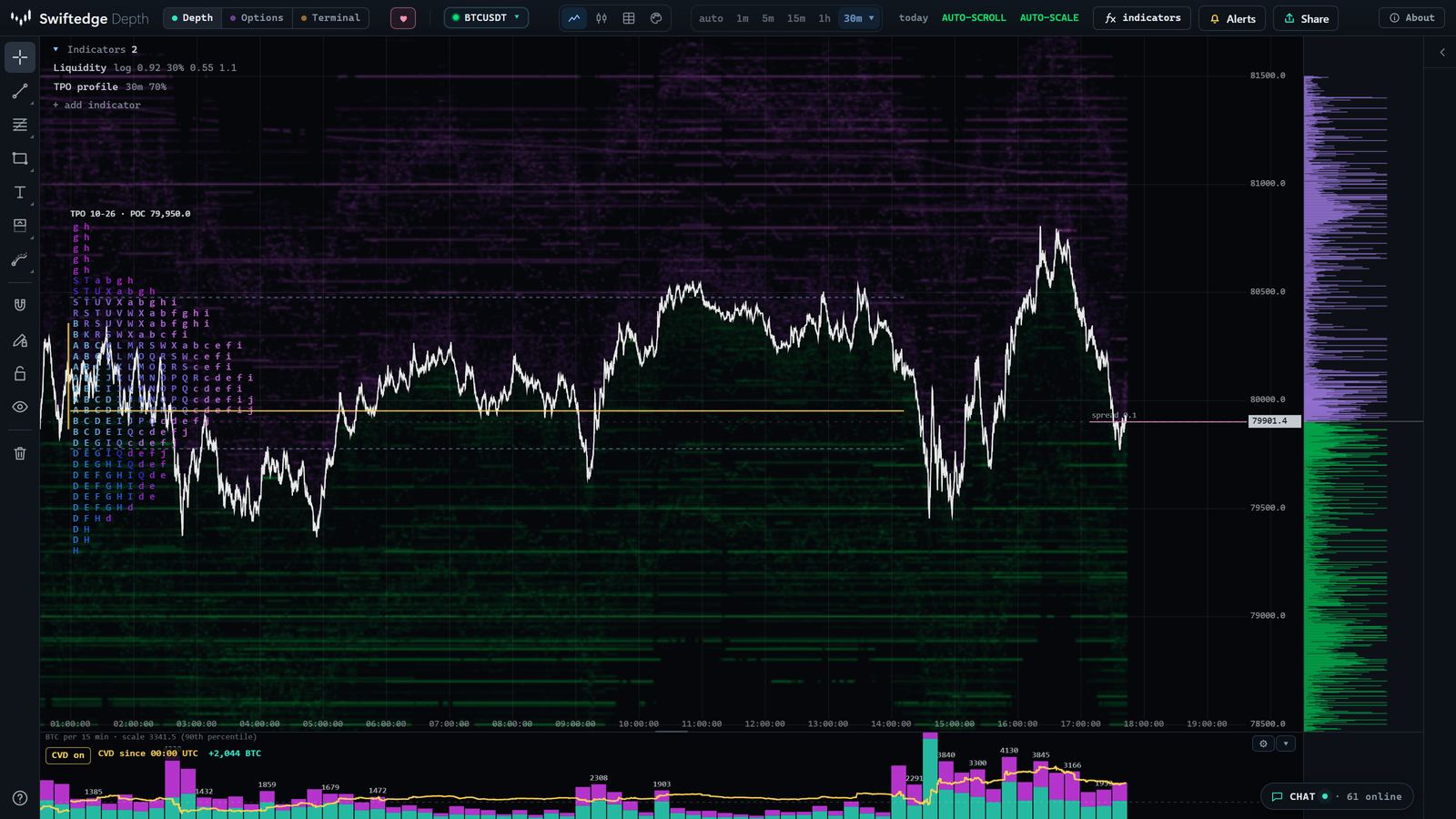
Today's TPO profile, live
Updated every five minutes, from 00:00 UTC, with 30-minute periods and rows of $25 for Bitcoin, $1.00 for gold, $0.75 for Ethereum and $0.25 for Solana.
| Today | Periods | TPO POC | Value area | Initial balance | Range | Single prints |
|---|---|---|---|---|---|---|
| Bitcoin | 16 | $80,900 | $80,825 – $81,100 | $80,660 – $80,868 | $80,577 – $81,200 | 2 |
| Gold | 16 | $4,042.00 | $4,037.00 – $4,063.00 | $4,067.22 – $4,078.52 | $4,037.07 – $4,078.52 | 7 |
| Ethereum | 16 | $2,354.25 | $2,349.00 – $2,361.75 | $2,343.57 – $2,349.45 | $2,339.31 – $2,369.28 | 5 |
| Solana | 16 | $102.00 | $101.50 – $102.00 | $101.12 – $101.31 | $100.96 – $102.41 | 0 |
| Yesterday | Periods | TPO POC | Value area | Initial balance | Range | Single prints |
|---|---|---|---|---|---|---|
| Bitcoin | 47 | $79,700 | $79,550 – $80,525 | $80,097 – $80,364 | $79,468 – $81,271 | 10 |
| Gold | 20 | $4,070.00 | $4,059.00 – $4,074.00 | – | $4,031.46 – $4,073.55 | 16 |
| Ethereum | 47 | $2,311.50 | $2,299.50 – $2,340.75 | $2,321.93 – $2,330.79 | $2,296.30 – $2,363.90 | 10 |
| Solana | 47 | $100.25 | $100.00 – $101.25 | $100.76 – $101.11 | $99.11 – $101.85 | 0 |
What a TPO profile shows
TPO stands for time price opportunity. The day is cut into periods, 30 minutes each by default. In every period, each price that traded gets the period's letter. Stack the letters sideways and you get a profile of where the market spent its time:
- TPO point of control. The price with the most letters, where the market spent the most time.
- Value area. The band around the TPO POC that holds 70 % of all letters, with its value area high and low.
- Initial balance. The range of the first hour. Later periods either stay inside it or extend the range.
- Single prints. Levels only one period traded at. Price moved through them in a hurry and left a thin spot.
- Shape. A fat, rounded profile is a day that rotated around one area; a long, thin one is a day that moved.
TPO or volume profile?
A TPO counts time, a volume profile counts size. Most of the time they agree. They disagree in useful ways: a price that was visited in many periods but with little volume, or a short burst of heavy volume at a price the market left again. In Depth you can show both on the same chart: open TPO and volume profile together.
The TPO profile in Swiftedge Depth
Add TPO profile from + add indicator (under Volume & VWAP), or open one of the links on this page. The gear next to its name opens the settings:
| Setting | Choices |
|---|---|
| Letter per | 30 minutes (A to X until 11:30 UTC, then a to x) or 1 hour (A to X across the day) |
| Draw as | Letters when there is room and blocks when there is not, or always letters, or always blocks |
| Levels | TPO POC and value area, the initial balance (first hour) and single prints, each on or off |
| Value area | 50 to 95 % of the TPOs (70 % by default) |
| Rows | Automatic from the zoom, fine or coarse |
| Look | Width (as a share of the day) and opacity |
| Data | One profile per UTC day, built from every trade, for about the last 48 hours |
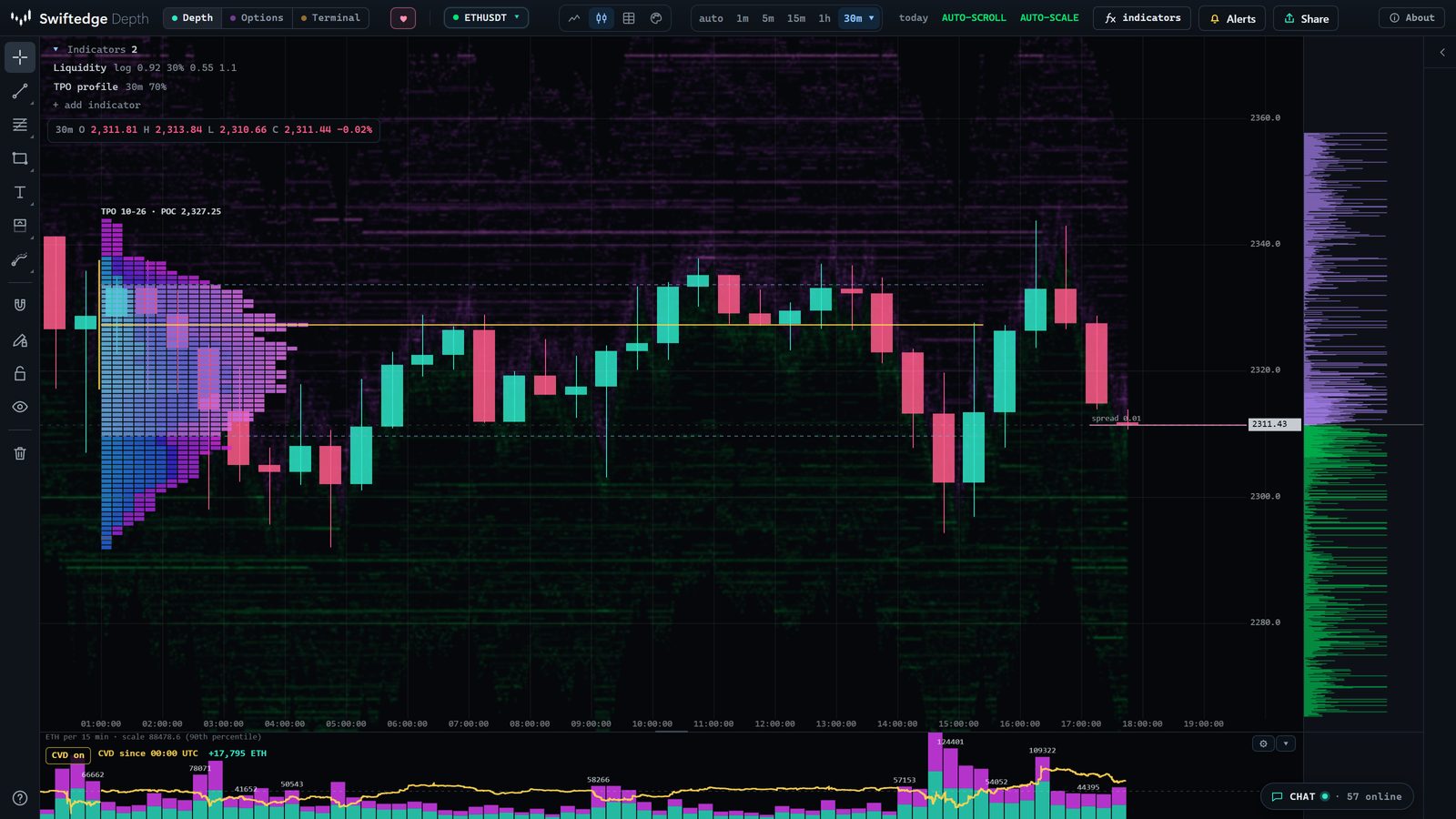
How to read it, step by step
- Start with the initial balance. Is price still inside the first hour's range, or has the day extended above or below it? The table above shows today's initial balance for each coin.
- Find the TPO POC and value area. They mark where the day has spent its time. Price far outside the value area is trading at prices the day has not accepted yet.
- Read the shape. Letters piling up in one area is rotation; a thin column of letters stretching in one direction is a trending day.
- Note the single prints. They are the day's fast moves. Whether price comes back to fill them differs from day to day.
- Compare with yesterday. Today's value area above, below or overlapping yesterday's says whether the market has moved on or is still trading the same prices.
- Look underneath. The heatmap shows resting orders, and the volume profile shows whether the time spent at a price came with real size.
Compared with TradingView, ATAS, Exocharts and Sierra Chart
From their own pages, checked on 26 October 2026 (Exocharts and ATAS prices as on our Exocharts and ATAS comparisons, Sierra Chart as on our Sierra Chart comparison):
| TPO | Markets and price | |
|---|---|---|
| Swiftedge Depth | Daily (UTC) profiles, 30-minute or hourly letters, TPO POC and value area, initial balance, single prints; over the live order book heatmap, with a volume profile on the same chart | Bitcoin, gold, Ethereum and Solana perpetual futures on Binance. Free, no account |
| TradingView | A TPO chart type since April 2024: daily, weekly or monthly profiles, blocks from 5 minutes to 4 hours, POC, value area, poor highs and lows and single prints (TradingView blog) | Thousands of symbols. The TPO chart type is for Premium subscribers and above |
| ATAS | A TPO and Profile indicator that shows TPO, a volume profile or both, by period | Crypto, futures and stocks on desktop. Free Start plan; paid plans from 19.95 EUR a month on yearly billing |
| Exocharts | Volume and TPO profiles in Desktop Pro | Many crypto exchanges and futures. Desktop Pro from 38 USD a month on six-month plans |
| Sierra Chart | A TPO chart in its packages with advanced features | Futures, stocks and crypto on desktop. Those packages from 36 USD a month |
Where the others are better: weekly and monthly TPO profiles (TradingView), poor high and low markers, long history and many markets. Where Swiftedge is different: it is free in a browser tab, and the profile sits on the live order book with the volume profile, footprint, liquidations and options levels one click away.
What it can't tell you
A TPO profile records where price spent its time on one venue, the Binance perpetual futures book. It does not include spot markets or other exchanges, it is drawn per UTC day only, and it does not say where price goes next. Market profile has a large body of interpretation built around it; treat those readings as ideas to check against the data, not as rules.
Common questions
What is a TPO chart?
A TPO (time price opportunity) chart, also called a market profile, shows how much time price spent at each level. Every period, usually 30 minutes, adds a letter at each price it traded at, so the profile grows sideways through the day.
What do the letters mean?
Each letter is one period. In Swiftedge, A is 00:00 to 00:30 UTC, B is 00:30 to 01:00 and so on up to X (11:30 UTC); the afternoon continues in lower case, a to x. With hourly periods, A to X cover the whole day.
What is the difference between a TPO and a volume profile?
A TPO counts time: how many periods traded at a price. A volume profile counts size: how much traded there. They often agree. When they don't, for example a price visited in many periods but with little volume, the two together say more than either alone. In Depth you can show both at once.
What is the initial balance?
The range of the first hour of the session, 00:00 to 01:00 UTC in Swiftedge. It is drawn as a yellow bar at the left edge of each day's profile. Traders use it as a first frame for the day; how often it breaks is not a constant.
What are single prints?
Levels inside the profile that only one period traded at: price moved through them quickly. Swiftedge shades them orange. The two outermost rows at the top and at the bottom of a day are left out, because the extremes are always visited briefly.
Can I see weekly or session TPO profiles?
Not yet. Swiftedge draws one TPO profile per UTC day for about the last 48 hours. For weekly and session views, use the volume profile, which has day, session, week, composite and visible-range modes.
Is it free, and which markets?
Free, with no account: Bitcoin, gold, Ethereum and Solana perpetual futures on Binance, the same books as the heatmap.