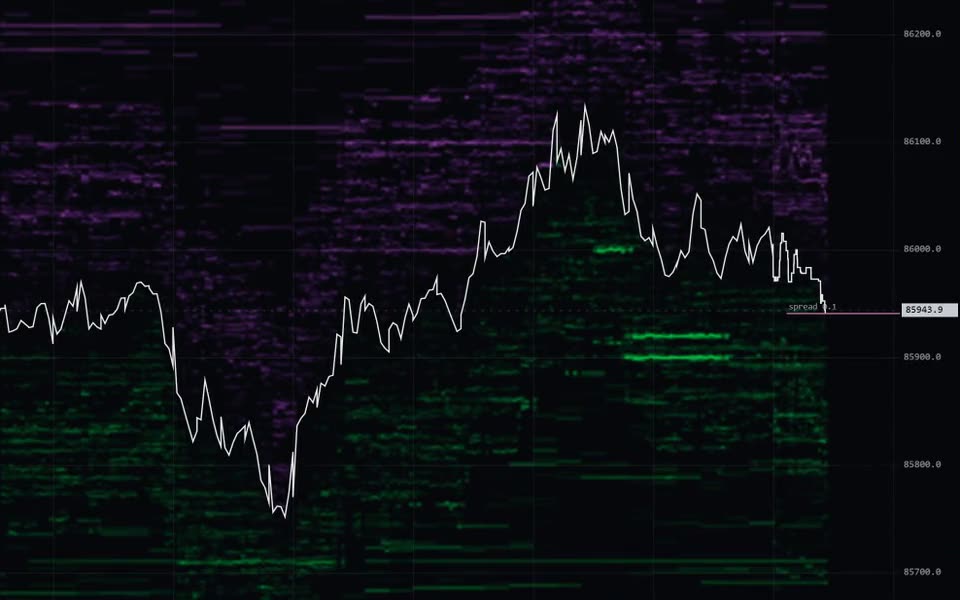
Swiftedge Depth — live Ethereum order book heatmap

Swiftedge Depth BTCUSDT today AUTO-SCROLL AUTO-SCALE
About

Swiftedge Depth: live Bitcoin order book heatmap

Swiftedge Depth shows the live Bitcoin futures order book (BTCUSDT perpetual, Binance USDⓈ-M; ETHUSDT at /eth/depth) as a heatmap, with every trade drawn as a bubble sized by volume and price as a line, candlesticks or a footprint chart. It adds a new column four times a second, keeps at least the last 24 hours of history (older hours load as you scroll back) and runs free in your browser with no sign-up. Made by Swiftedge.

What you are looking at

  • Heatmap: resting limit orders by price and time. Green below price are bids, violet above are asks; brighter means more size.
  • Bubbles: executed trades. Teal for aggressive buys, violet for aggressive sells; the size is the volume.
  • Price: a white line, candlesticks (1 second to 4 hours) or a footprint chart, chosen with the three icons in the top bar. The footprint shows volume sold into the bid and bought from the ask at every price in each candle, with diagonal imbalances, the point of control (yellow box) and a volume, delta and delta % table that can be minimized or resized.
  • Lines and panes: the day's VWAP in yellow, traded volume underneath with CVD since 00:00 UTC (the CVD button in the pane's corner; drag the pane's top edge to resize it or minimize it with ▾) and a depth profile of the current book beside the price axis.
  • Side panel: Mentor analysis, Session Orbs, GEX options levels, 5-minute flow, buy vs sell and news.

How to use it

  • Mouse: the wheel zooms time, shift + wheel zooms price, drag pans, double-click returns to live.
  • Touch: drag to scroll, pinch to zoom time or price, double-tap to return to live, press and hold to inspect a bubble or level. On a phone the bar at the bottom holds Indicators, Draw, Alerts, Share, Chat and More.
  • Line, candles, footprint and the timeframe (auto, 1m, 5m, 15m, 1h, more under ▾) sit in the top bar. Links can open a view directly, for example /depth?chart=footprint&tf=1m.
  • today shows the whole day; AUTO-SCROLL follows the live edge and AUTO-SCALE refits the price axis.
  • indicators or + add indicator opens the catalogue: Liquidity, Bubbles, Executions, VWAP, Mentor, Session Orbs, GEX, Liquidations (real forced closes from Binance, OKX and Bybit), Stacked imbalance zones and the Imbalance readout. The toolbar on the left has 24 drawing tools, saved in your own browser.
  • Alerts sets price and large-wall alerts with sound and browser notifications. Share turns the moment under the pointer (or now) into an image card with a link. Chat is one live room shared with Options.

Quick answers

Is the footprint's buy and sell split real?
Yes. Every trade from Binance carries the aggressor side; Depth adds it to the bid or ask column of its price row. About 48 hours of footprint and candle history are available.
Is it free?
Yes, during the public beta, with no account. A free version will remain available.
Where does the data come from?
Order book and trades from Binance USDⓈ-M futures; options data for GEX from Deribit, OKX and Bybit, one snapshot per minute.
What is GEX?
Estimated options gamma exposure, with the gamma flip, call wall and put wall drawn on the chart. The dealer positioning behind it is an assumption, not a measurement.
Is it financial advice?
No. Depth shows market data and descriptive analysis for information and education. Trading involves substantial risk of loss.

Learn more

Swiftedge Options (the live BTC options chain) · How to read the options chain · How to read a Bitcoin order book heatmap · How to read a footprint chart · Stacked imbalances · Order book heatmap guide · Takers, makers and absorption · Liquidity walls · CVD · Spoofing and pulled walls · GEX · Bitcoin levels today · What's new · Glossary · FAQ · Daily BTC report · About Swiftedge · Home

5m flow
Aggressive volume in the running 5-minute window, reset every five minutes. Cyan lifted the ask, violet hit the bid.
Buy vs sell
The share of volume that lifted the ask, per timeframe. Binance marks which side crossed the spread — not who wanted it more.
News